Sunday, November 29, 2009

The Computer Lab:


P1020417

The computer lab is now the most common element of a modern photography classroom. For the most part, our computer lab is adequately accessible– although there are various desk and table sizes, some of which are too tall for a student in a wheelchair.

As far as stands go, The Americans with Disabilities Act Standards for Accessible Design handbook provides the following chart (p. A15) for desk heights, according to wheelchair type and work type:

Our students will be doing "light, detailed work" on computers and would therefore require a range from 29" to 34" tall. The easiest way to achieve these heights is by having desks that have adjustable height on the fly. In an ideal world my computer lab would consist of motorized desks, such as this one, which has a simple two-button control center at the front for immediate adjustment:
Again, the computer lab is much easier to accommodate than a traditional darkroom. But, I strongly believe it should exist as a tool in addition to the darkroom and not as a shortcut.

The Cameras:

We use two cameras in our classroom, Canon Rebels:


And Pentax K1000's:


Both cameras are functionally similar, as far as having a lens, a viewfinder, and manual controls. The Canons are modern digital single lens reflex (SLR) cameras, complete with autofocus and automatic exposure. The Pentax is old and reliable, fully manual with no automatic features whatsoever.

Neither of these cameras should pose too great a challenge to an individual with mobility issues, assuming they have adequate control of their arms. The Canon is lighter and easier to use because of the automatic features, but the Pentax is less complex and requires little effort to use.

When we send students out to photograph, they always go out in pairs or trios, being as we don't have enough cameras for every student anyhow. Pairing students properly can help make sure a student can achieve the photographs they plan for and receive aid from a peer when necessary.

What if the students lack access to their arms?
There are a few instances where students arms will be occupied providing mobility, such as when using forearm crutches commonly used for long-term disabilities such as polio.

For a student in this position, the first adaptation I would propose would be camera chest-harness, to stabilize the camera at their waist and neck when walking. This would help students maintain balance, reducing the risk of injury to the student due to the camera swinging around.

If a student on crutches can stabilize themselves to stop and photograph, this harness should be an adequate accommodation.

For students that have limited use of their arms, there are a few more adaptations to consider:

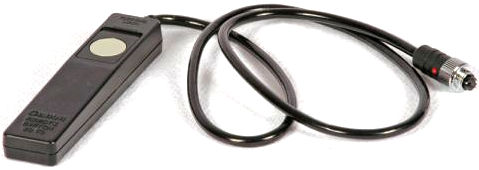
Tripods: Because our students are sent in pairs, you can pair your student with a peer who can help carry a tripod. With a good, sturdy tripod, the student can compose their images with added stability. In addition to the tripod, the camera can have a shutter release cable attached, which allows students to take a photograph with a small cable in their hand. Though the tripod may feel like a constraint to those without mobility disabilities, I feel it serves as an advantage for those that lack the stability or use of their arms.

Directorial Photography: Does the photograph have to be physically taken by a student for it be theirs? I believe in an approach that I'll call directorial photography. In this case, students can direct a peer or aid in what composition they are interested in creating. Shyness and communication are the most direct barriers in a situation like this, but an accommodation like this can provide an avenue for all students to participate in the making of images, even those with no vision.

There may be other adaptations that function in a similar fashion. There are small chest-mounted or helmet-mounted digital cameras available, but these do not allow for the use of traditional film formats– a must in a photography classroom.

Saturday, November 28, 2009

The Enlarger:


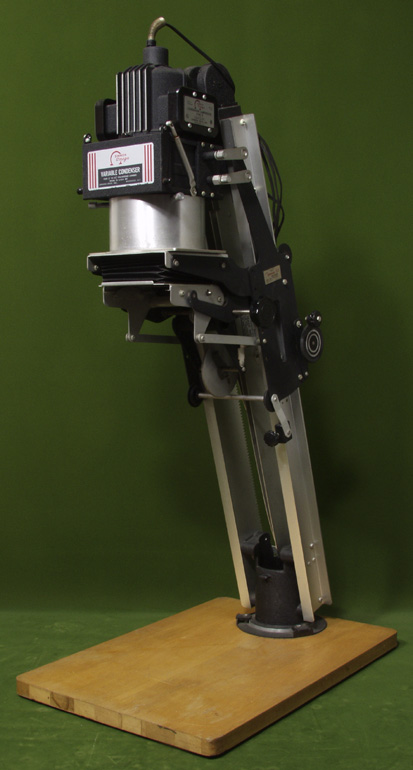
The enlarger is like the camera of the darkroom. Without an enlarger, we cannot make prints from our film. Our darkroom has 18 full size enlargers like the Omega pictured above. Set upon a standard, accessible counter, it stands roughly 6 1/2 feet tall (the enlarger itself being 4 feet). How can someone in a wheelchair utilize an enlarger to the fullest capacity?

The diagram below labels each essential element of an enlarger:

The following elements need to be accessible to all students:
  • The easel: to hold your photographic paper in place.
  • The focus knob: to bring your image into focus.
  • The lens: to adjust the amount of light exposed to the paper.
  • The height adjustment lever: to change the size of your enlargement.
  • The negative carrier: to hold your film in place and project it onto the easel.
Many of these knobs and levers may be out of reach for someone working out of a wheelchair. There are a few adaptions/accommodations I've come up with to make an enlarger more accessible.

Use a motorized enlarger: Motorized enlargers utilize a button array to raise and lower the condenser head (the light source). By having this motorized system, all students can raise and lower the device to attain their desired print size. You can purchase an entire enlarger with a motorized chassis such as the Beseler 45V-XL, but at $3000 it is perhaps unattainable for most high school budgets. It is, however, highly probable to a find a used/retired motorized enlarger for a much lower price.

Place the enlarger on a lower level: If placed at lower height, perhaps 20 inches off of the ground (using whatever resources available– plywood, cinderblocks, stools, etc.), one would be able to reach all the necessity elements without the easel being too far down as well. I'm not too fond of this solution, but it serves as a feasible workaround for giving all students access.

Turn the enlarger ninety degrees and project: This is my favorite solution; enlargers can be mounted to a counter at a ninety degree angle, facing the wall rather than the floor. Mounting the enlarger to a surface in this matter eliminates any vertical movements and makes all necessary adjustments lateral. Here is an image of an enlarger set up in this way:

This set up is traditionally used for extra large printing (mural printing), but within a small space it can produce smaller, more common sized images. This method requires some modification to an enlarger station but is relatively inexpensive and the most functional.

Contemplating how to utilize an enlarger from the perspective of someone with a mobility disability is challenging, I found myself having to sit in a chair and stare at the enlarger. It truly helps to visualize the challenge as well as experience it, so that one may devise the absolute best adaptation.

Thursday, November 26, 2009

The Darkroom:


The darkroom is another element in a truly complete photography classroom. Here, students can enlarge their film and make prints for assignments and themselves. Without the darkroom, their is no sense of completion in a project.

Many of the challenges in mobility and accessibility faced in the darkroom are parallel/similar to those of the developing sink and classroom. Students stand at their enlarger station and expose their photographic paper to the film. After the exposure, students walk to the sink with a chemical array in the center of the darkroom. I have provided a labelled image of our darkroom below:

Is this an accessible darkroom for someone with mobility disabilities? As of now it is not, but it can be adapted to accommodate. The space between the stations and the sink is ample for almost any wheel chair, as is the entrance and passage way to the darkroom itself. Here, the major challenges are, much like the developing sink, the height of the sink, the counters, the enlarger stations, and the storage shelf. The enlargers themselves present another challenge, but will be discussed in detail in a later entry.

Again a few options come to mind, some which I would recommend against:
  • Buddy Printing: Unlike the developing sink, where "buddy developing" would theoretically still give the student with a disability responsibility and autonomy, enlarging requires personal attention from the student him/herself. When making enlargements, students make subjective decisions on contrast, size, print-quality and cropping. Although a student could state their desired outcome, it would ultimately take time away from a peer and relieve the other of responsibility. An exemption would be a situation where the student would do the enlarging and receive aid in the processing of the print.
  • Customizing the sink/counters: The sink could be accessible to someone in a wheelchair if lowered 12 inches. The counters are actually already at desk height, but the space below is utilized for storage of chemicals and other darkroom necessities. These spaces below could cleared out in a few enlarger stations to accommodate for a wheelchair to roll into, giving access to all students.
  • Auxiliary enlarger station and developing station: Again, one can accommodate for a student in a wheelchair or otherwise disabled in mobility by creating an additional station and sink array. The chemicals can be placed almost anywhere, as they are placed within trays. A wheelchair accessible sink array is definitely ideal, such as this one made by Richards of Hull:Installing a sink like this in addition to or in replacement of the existing, taller sink would eliminate the inaccessibility. The same sink could alleviate the issue for the developing area as well!
  • Lowering storage: Some tools and supplies are kept beyond the reach of someone in a wheelchair, a few of each tool and supply could be kept in a lower storage area, as these areas are readily available and would require little work.

While it appears our darkroom may not have been designed completely with universal access in mind, it provides ample space and room for customization. Given time (and funding), this darkroom could easily be accessible to almost any student.

Why not skip the darkroom and use a computer? Mark Peterson, co-author of Access to Photography: Making Photography Accessible to Persons with Exceptional Educational Needs, discusses why the darkroom is an essential element of a photography course:
"It is certainly possible to take great pictures without practice in the darkroom, and it surely is convenient to let someone else do the developing, but it may not allow you to be the best photographer that is possible for you" (Peterson, 45-46)
Peterson's chapter discusses how to setup a darkroom almost anywhere and guarantee access to all. His article was published in 1989– a time before the digital revolution, but at the dawn of 1-hour photo labs. The same reasoning applies; students could take a shortcut to the computer, but they would lose the valuable experience of the darkroom that could help them grow to becoming great photographers.


Tuesday, November 24, 2009

The Developing Sink:

P1020418

The developing sink is an integral element of a traditional photography classroom. Here, students develop their film. Developing film takes between 40-60 minutes, depending on the type of film and the temperature of the chemicals. In our classroom, pictured above, the sink stands 4 feet tall– to accommodate for students to stand and process their film for the duration of the development. While having a high sink and counter is advantageous to those who can stand comfortably while developing, it clearly does not create a desirable situation for those with physical disabilities.

With this scenario, a few adaptations come to mind (some more feasible than others):

Develop with a buddy: The easiest approach is to pair your student with a peer. The developing tanks for film come in three flavors; single, double, and quadruple. If the peer and student with the disability have the same film, they can double up without making more work for the peer. While it seemingly takes the responsibility away from the student with a disability, there are in fact several elements the student can complete without aid.
  • Rolling the film onto a reel: the very first step of developing film is removing it from the canister and rolling it onto a developing reel, then into a light-tight developing tank. This step must be done in entire darkness; either in the darkroom or with a film rolling bag. Assuming this student has mobility issues and not a general orthopedic issue that affects all motor skills, he/she will be responsible for rolling the film.
  • Agitation of chemicals: although the student may not be able to reach the graduates and funnels, he/she can hold the canister and take care of keeping the chemicals in motion to insure even development. Along with agitating the chemicals, he/she can keep track of proper time for each step in the process.
Lowering the sink or providing a ramp: This option is not quite as easy to execute as the previous, and provides perhaps more challenges than solutions. If we were to lower the sink to an equally accessible height, there would still be an issue of shelving being too high and the management of large chemical containers. The shelving could be replaced with cabinets below, and large containers of chemical should ultimately be handled by the professor anyhow. Providing a ramp still faces the same logistical dilemmas while possibility posing a safety threat for all students.

Have an "auxiliary sink": A separate "sink" could be set up for students who cannot reach the existing sink due to mobility disabilities. This could be a series of trays or tubs that can later be drained by the instructor or an assistant. A truly ideal situation would be to have two developing areas– one standing height and the other wheelchair height. This would not only facilitate autonomy for those with mobility issues but also allow more students in general to develop their film and reduce crowding. Of course, plumbing, construction, and the negotiation space would be issues and barriers.

Of these options I feel "buddy developing" is the most reasonable. Not only does it help the student develop his/her film, but also creates a social interaction without removing all responsible from the student with a mobility disability. It is always important to consider how you can promote self-respect and autonomy for all students, but especially for those who start at a disadvantages.

The Classroom:

the classroom
The classroom is the first space students step into when entering the photography studio. It is important that every element of the photography classroom is adapted for accessibility. If a student with a mobility disability enters the classroom and immediately faces unnecessary challenges, it creates a sort motivational deficit to start from.

A classroom should be arranged to create the least restrictive environment possible. In the case of students with mobility disabilities, one of the first and most basic accommodations to make is to create a space that allows for and promotes movement. This means every aspect of the classroom should be accessible to a student in a wheelchair, on crutches, with a walker, etc. Some key approaches are to:

  • Make sure passages are 32 inches or wider, the most common width of wheelchairs
  • Keep aisles clear of debris– this includes book-bags and other student artifacts, clarify with all the students the necessity to keep their belongings out of the way and regulate regularly.
  • Insure that doorknobs, sinks, cabinets, and lockers are at an accessible height, make minor adaptations, such as ramps, if possible. For major changes consult you school's administration in charge of maintenance and repairs.

These are a few starting points to preparing your classroom in an accessible manner, although the intricacies of each classroom will dictate what other adaptions and customizations should follow.

Saturday, November 21, 2009

Defining mobility disability:

Individuals with Disabilities Education Act of 2004 (IDEA):
There are thirteen disabilities IDEA lists– students with mobility disabilities are categorically placed under Orthopedic Impairments. A student under this definition has a physical condition that seriously impairs mobility or motor activity. These disabilities are to be accommodated for if they are adversely affecting the education of the student. In the 2006-2007 school year, 126,654 3 to 21-year-old students were served under IDEA (source). It is approximated that 7.1% of the students served under IDEA have physical have physical disabilities or other health impairments (Mastropieri & Scruggs).

Americans with Disabilities Act of 1990 (ADA):
Of the ADA documents I've read, none have specifically defined "disability" but rather clarify the civil rights of a citizen with disabilities. Disability.gov, a government website dedicated to providing disability-related information and resources summarizes ADA:

"The Americans with Disabilities Act (ADA) guarantees equal opportunity for people with disabilities in public accommodations, employment, transportation, state and local government services, and telecommunications."

Mastropieri & Scruggs (The Inclusive Classroom):
In their book, The Inclusive Classroom, Mastropieri and Scruggs expand how mobility disabilities are defined and served within IDEA. These physical disabilities can be from moderate to severe and exist permanently or temporarily. Some of the more common physical disabilities are cerebral palsy, epilepsy, spina bifida, scoliosis, and muscular dystrophy. Along with diseases, traumatic brain injury from accidents can cause physical disabilities.

Physical disabilities are also often referred to by what part of the body is affected. These most common terms are:

Quadriplegia: both arms and legs are impaired.
Paraplegia: paralysis of the lower body.
Hemiplegia: paralysis of one side of the body.

Most students with physical disabilities will need to rely on assistive mobility devices such as motorized wheelchairs, braces, canes, and crutches.

Now that we have a working definition of our student body, how does one approach teaching in an accessible, self-empowering way?


Monday, October 26, 2009

This is a test

In here will be words and images related to things of interest.
Here are some ducks for now.